
Media Carousel turns customer-generated videos and photos into a powerful visual showcase on your store.
It presents real customer experiences in a smooth, scrollable carousel, allowing shoppers to see products in action before making a purchase.
By placing authentic media content directly on the home page, Media Carousel helps:
Build trust through real customer experiences
Increase engagement with interactive visuals
Strengthen purchase confidence and drive conversions
Visual layout
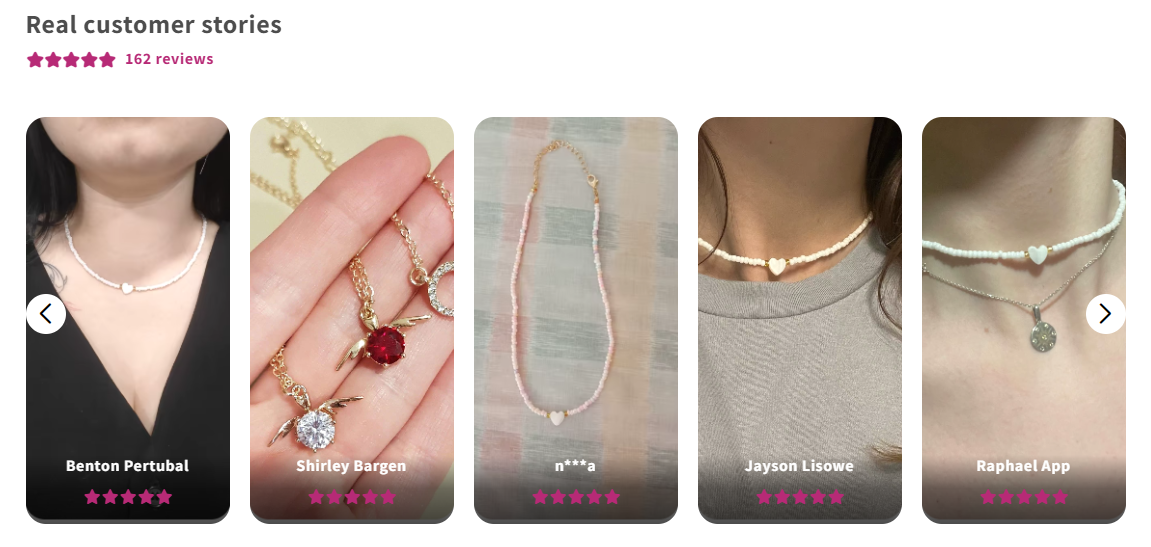
Media Carousel highlights real customer experiences in a clean, card-based layout directly on your home page.
Each review is displayed as a visual card featuring customer photos or videos, helping shoppers instantly see how the product looks in real life.
This layout focuses on authenticity and clarity, making social proof easy to scan and highly engaging without overwhelming the page.
When shoppers click on a media card, a modal opens to display the full review content, with a direct link to the related product (if applicable).
How Media Carousel works
Once added to your theme, Media Carousel will:
Pull media-rich reviews (videos, photos, or both) based on your selection manual
Allow visitors to browse content by scrolling or using navigation controls
Optionally autoplay videos for a more dynamic browsing experience
Adding Media Carousel to your store
In Online Store → Themes, click Edit theme
On the home page, click Add section
Open the Apps tab
Select Media Carousel
Drag the block to adjust positioning if needed
Click Save
Styling options
Fine-tune the look and feel to match your brand:
Corner style: square or rounded
Star, text, and arrow colors
All changes update instantly in the live preview.
Behavior settings
Define how the carousel behaves:
Enable or disable video autoplay
Adjust transition speed between items
Header customization
You can personalize the section header by:
Editing the default title text
Showing or hiding the average rating summary beneath the header